Unlock The Power Of LLMs: What You Need To Know To Get Started
Understand LLMs fast so you can take your first step into practical AI, learning what they are, how they're built, where to find them, and how to use them effectively.

Look, I've been working with Large Language Models for a while now, and they're genuinely changing how we get things done. You can throw a dense report at one of these models and get back a summary that actually makes sense. Need some code? It'll draft that too. Wrestling with a complex decision? The model can help you think through your options. And the best part? You get results in seconds. This shift is touching everything we do, from how we search for information to how we create content and make decisions. If you want to understand the bigger picture beyond just daily workflows, check out how GenAI is reshaping the labor market and business landscape.
You're probably already using this stuff without realizing it. Those virtual assistants and chatbots that actually seem helpful now? That's LLMs at work. I've seen scientists use them to explore hypotheses, dig through literature, and pull out structured insights that would've taken weeks to compile manually. This isn't some future promise. You can literally start using these capabilities today.

What you'll learn in this guide
How LLMs are actually built, from the transformer architecture through pre-training, fine-tuning, and that whole RLHF thing
The real difference between base models and instruction-tuned models (spoiler: one actually follows your directions)
Where to find these models. I'll show you the main hubs and platforms that are worth your time
The popular models in 2025 and what makes each one special
How to actually interact with LLMs. We're talking prompts, context windows, APIs, the whole deal
Practical use cases you can implement in your work tomorrow
How LLMs Are Created
Let's start with transformer basics. So LLMs are built on something called the transformer architecture. Basically, a transformer uses this mechanism called attention to figure out how different tokens relate to each other. What's a token? Think of it as a small chunk of text, maybe a word or part of a word. The attention mechanism helps the model keep track of context across long sequences. It's also what lets the model capture meaning at different levels, which is pretty neat when you think about it.
Pre-training at scale comes next. This is where things get wild. The model learns from absolutely massive amounts of text. We're talking web pages, books, code repositories, curated datasets, you name it. During pre-training, the model just tries to predict the next token in a sequence. It does this over and over, across literally trillions of tokens. After all that repetition, the model starts to absorb grammar patterns, facts about the world, different writing styles, all sorts of patterns.
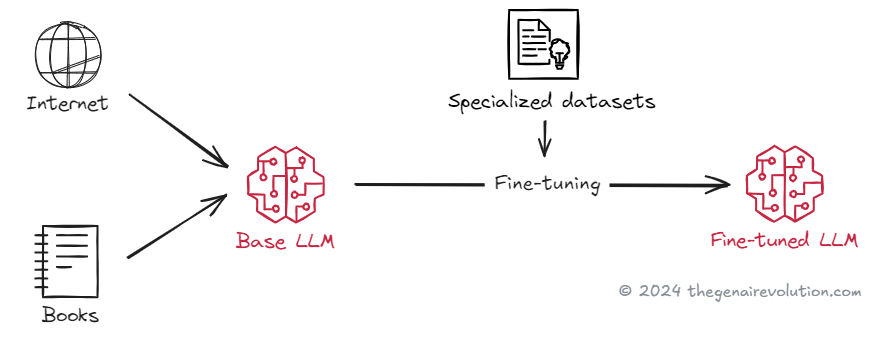
The compute and cost are honestly mind-blowing. Training these models requires clusters of GPUs or specialized accelerators. A single training run can take weeks or even months. The cost? Let's just say it's significant enough that only large labs or really well-funded teams can afford to do pre-training from scratch.
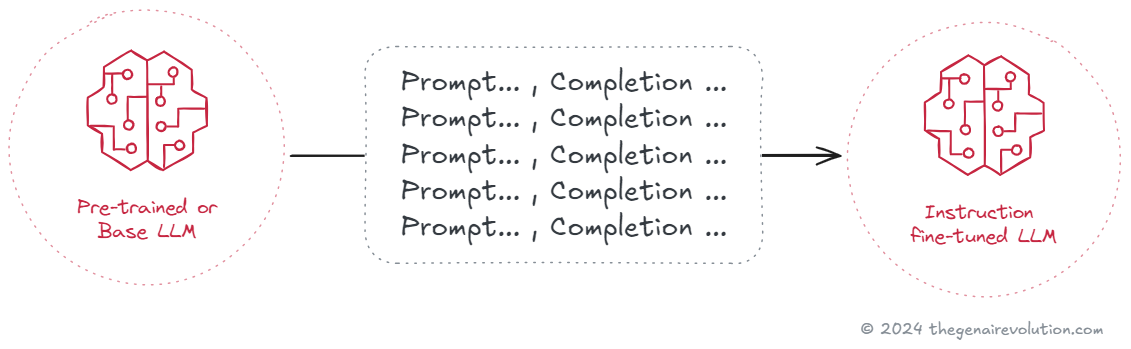
Here's where base models and instruction-tuned models differ. After pre-training, you get what we call a base model. It's great at predicting the next token, and it has absorbed tons of knowledge. But here's the thing, it doesn't reliably follow instructions. Ask it to summarize something, and it might just continue writing in the same style instead. It's also not tuned for any specific domain you might care about.
Task-specific fine-tuning changes the game. This is where you adapt the model for what you actually need. You can fine-tune on labeled examples to get better at classification, summarization, or writing in a specific domain. Instruction fine-tuning is particularly interesting. It teaches the model to actually follow natural language instructions. This is what makes those instruction-tuned models feel helpful and actually do what you ask them to do.
RLHF and alignment make things even better. Reinforcement Learning from Human Feedback (we just call it RLHF) comes after fine-tuning. Basically, humans rank different model outputs. Then a reward model learns what humans prefer. The base model gets optimized to produce responses that score higher for quality, safety, and usefulness. This step is crucial for reducing harmful content and making the model genuinely helpful.
Model size is a real trade-off. Parameters can range from millions to billions, sometimes even trillions. The larger models often show what we call emergent abilities. They get better at reasoning, coding, generalizing to new tasks. But smaller models have their place too. They're cheaper to run, easier to deploy. Actually, with good fine-tuning and smart prompting, a smaller model can deliver really strong results for narrow use cases. You get better efficiency and lower latency, which matters a lot in production.
Top Model Hubs
You don't have to build anything from scratch. Here's where you can find models, datasets, and all the tooling you need:
Hugging Face. This is the big one. A massive open-source ecosystem with models, datasets, Spaces for demos, and libraries for fine-tuning. You can even host and deploy models using their managed services.
OpenAI. They give you API access to GPT-4o and those o1 reasoning models. The documentation is solid, they have good SDKs, and platform features for evaluations and safety tools.
Google Vertex AI Model Garden and AI Studio. You get access to multilingual and multimodal models here. If you're already using Google Cloud, the integration with Vertex AI is really tight.
Meta Llama resources. You can grab Llama model family checkpoints for research or practical development. These models are efficient and friendly for fine-tuning and on-premises deployment.
Cohere. Really developer-friendly APIs for generation, classification, embeddings, and complete workflows. They focus heavily on enterprise integration, which is nice if that's your thing.
EleutherAI Model Zoo. Community-driven open models like GPT-J and GPT-NeoX. Great for research and when you want to do custom fine-tuning.
Anthropic Claude API. Access to Claude models with a strong emphasis on safety, alignment, and those long context use cases that other models struggle with.
The Most Popular LLMs
Let me break down the models everyone's using in late 2025. This should help you figure out what might work for your needs:
OpenAI GPT-5.1 and the o-series reasoning models. GPT-5.1 is fast and handles text, vision, and audio all in one go. The o-series is specifically built for complex reasoning and step-by-step problem solving.
Google Gemini 3 Ultra, Pro, and Flash. These handle multimodal inputs across text, image, and audio. The integration with Google Cloud services is deep, and they're really efficient at handling long contexts.
Anthropic Claude 3.5 Sonnet. Strong on safety, handles long contexts well, and reliably follows instructions. I've found it's a solid choice for sensitive domains and research assistance.
Meta Llama 3.1 and 3.2. Open models that balance efficiency and quality nicely. Great when you need on-premises or VPC hosting because data control matters. The 3.2 version added some lightweight multimodal variants too.
Mistral Large and Mixtral 8x22B. These give you competitive performance with efficient inference. Perfect when you need speed and lower costs but still want strong outputs.
Qwen2.5 by Alibaba. High-quality open family that's good at reasoning, coding, and multilingual tasks. Really strong option if you're looking to fine-tune or do custom deployments.
DeepSeek-V2.5. Open model family that focuses on reasoning and code. Useful when you want strong performance with transparent licensing terms.
Interacting with LLMs
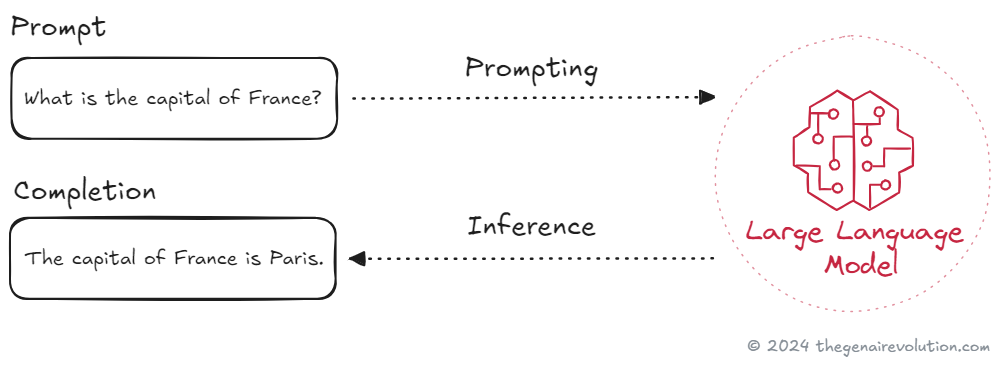
Working with LLMs is actually pretty straightforward. You can use natural language prompts or programmatic APIs. You write clear instructions, the model returns a completion, and then you iterate on your prompts to get better results.
Key concepts to know
Context window. This is the maximum number of tokens the model can consider at once. It includes both your prompt and whatever the model generates back.
Completion. Just the model's generated output. You can ask for text, code, or structured JSON, depending on what the model can do.
Inference. The actual act of running the model to produce a completion. You can do this in the cloud or on your own hardware if you've got the resources.
Retrieval augmented generation. We usually just call it RAG. The model retrieves relevant documents from your data, then uses them to ground its response. This really improves accuracy.
Tool or function calling. The model can call tools, APIs, or databases as part of its reasoning process. This lets it do things like run a query or create a support ticket.
Structured output. You can ask the model to return JSON that matches a specific schema. This makes downstream automation so much easier.
If you're thinking about orchestrating tools or building agent behavior, you should review principles for designing reliable and scalable AI agent systems.
Choose an interaction path
Direct user interface. Just use a chat UI to draft content, analyze text, or explore ideas. This is the fastest way to boost individual productivity.
API integration. Call the model from your app or backend. This is the way to go when you need automation, custom logic, or integration with your existing data.
Think about what you actually need. A chat UI helps you move quickly when you're experimenting. An API gives you control over prompts, retrieval, guardrails, and monitoring.
Common Use Cases of LLMs
You can apply LLMs across so many workflows. The key is starting with a clear goal and measurable outcomes. Here are practical use cases I'm seeing in production right now:
Enterprise search with RAG. Turn that messy knowledge base into something that actually gives accurate answers. Connect the model to your docs, wikis, support tickets, chat logs. Use retrieval and citations so you can verify each answer.
Customer support copilots. These suggest replies, pull case history from your CRM, draft resolutions that follow your policies. They hand off to humans when confidence is low. You can improve first-response time and deflection without losing control.
Sales and success assistants. Auto-generate call summaries, next steps, CRM updates. Draft follow-up emails that actually reflect your product catalog and pricing. Surface churn risks based on notes and sentiment analysis.
Document intake and extraction. Read contracts, invoices, forms. Extract fields into a schema with confidence scores. Flag anything weird for review. Use structured output so you can push data directly into your systems.
Coding copilots and modernization. Generate tests, fix lint errors, explain that weird legacy code nobody understands. Propose safe refactors with diffs. Migrate small services by suggesting target frameworks. Always keep humans in the loop before merging anything. For rollout guidance, see practical strategies for adopting AI-powered development tools and copilots.
SQL and analytics copilots. Translate business questions into SQL. Validate against your schema and safety rules. Return charts with the query attached. Let analysts review and approve before running anything in production.
Content production with brand guardrails. Create ad variants, product descriptions, landing page copy. Enforce your tone and compliance with style prompts and checkers. A/B test variations automatically.
Meeting and communications AI. Real-time transcription, action item capture, summaries that sync to your task management tool. Pull related docs into the notes. Share a concise recap that links back to the recording.
Search and recommendation quality. Use embeddings for semantic search. Rerank results with a lightweight model for relevance. Add query rewriting to handle ambiguity. You can improve click-through without changing your whole index.
Voice, telephony, and contact centers. Run voicebots that schedule appointments or verify identity. Provide live agent assist with knowledge snippets and suggested actions. Score calls for quality and compliance automatically.
Safety, compliance, and privacy. Redact PII, check content against internal policies, generate audit trails. Add automated pre-screening for regulated content. Always keep a human review step for edge cases though.
Security operations assistance. Triage alerts, summarize logs, draft investigations that link to evidence. Generate detection rules from plain English descriptions. Keep final approval with your analyst.
Healthcare and clinical documentation. Draft clinical notes from transcripts with templated sections. Pull medications and diagnoses into structured fields. Always require clinician review and sign-off before any record update.
Scientific and legal research. Map out a topic, summarize papers or case law, extract key claims with citations. Track provenance so you can check the source. Never let the model make up new facts without evidence.
Agentic workflows and automation. Let the model plan multi-step tasks. It can call tools, run checks, recover from failures. Use guardrails, timeouts, and approval steps to stay safe. Learn more about building adaptive automation with agentic AI.
Honestly, if you need a simple first project, just pick one workflow that already has examples and labeled data. Add retrieval to ground the model on your actual content. Ask for structured JSON with confidence scores. Measure accuracy and time saved before you even think about scaling.
Conclusion
So now you've got a clear picture of how LLMs work and how to actually use them. Transformers enable pre-training at massive scale. Base models predict the next word. Instruction fine-tuning and RLHF turn that raw capability into something that actually follows your directions and behaves helpfully.
You know where to find models too. Hubs like Hugging Face, OpenAI, Google's Model Garden, Meta's Llama resources, Cohere, EleutherAI, and Anthropic give you instant access to cutting-edge models. The popular models I listed above should help you match capabilities to what you actually need. You can interact through simple prompts or integrate through APIs. Just remember to measure accuracy and time saved before you scale anything. Then apply frameworks and case studies for measuring AI ROI to guide your investment decisions.
Your next step? It's simple. Pick a hub. Try a model. Write a prompt. Test a small use case in your actual workflow. The thing about AI applications is they're immediate and accessible. You can literally start today and learn by doing.