How to Build Multi-Agent AI Systems with CrewAI and YAML
Build production-ready multi-agent AI systems with CrewAI using reusable YAML-first patterns and explicit tools and tasks.

This guide walks you through building a multi-agent customer feedback analysis system with CrewAI. You'll define three specialized agents - one for sentiment evaluation, one for report summarization, and one for visualization - that collaborate in a structured workflow to process raw feedback, generate insights, and produce a final report with charts.
You'll see how to set up agents and tasks in YAML, integrate tools (in this case, a CSV file reader) for grounded analysis, validate structured outputs, and produce visualization snippets. All the code is ready to run (you can use Colab) with minimal setup.

By the end, you'll have a functioning multi-agent system that converts raw feedback data into reusable, structured analytical reports.
Building Blocks of Multi-Agent Systems in CrewAI
When I first started building multi-agent systems, I thought of it like putting together a small team at a startup. In CrewAI, you organize around Agents, Tasks, Tools, Crews, and Training. These are the foundation for scaling and maintaining your system. What I particularly like about CrewAI is that it supports defining agents and tasks in YAML, which separates configuration from code. This makes things much easier to manage and adjust over time—trust me, you'll be tweaking these configurations more than you think.
Agents
Agents represent roles, goals, and backstories. You define them in YAML. Each agent gets assigned tools (if needed), and memory or code permissions depending on their responsibilities. This keeps responsibilities explicit and honestly helps reduce those annoying hallucination errors we all deal with.
If you're interested in how agent design can be extended to more complex, stateful workflows, our guide on building a stateful AI agent with LangGraph offers a practical, step-by-step approach.
Tasks
Tasks are basically what you want your agents to accomplish. Each task has:
A description of what needs to be done
An expected output format
An agent assignment
You define tasks separately in YAML. And here's something I learned the hard way—you can have more tasks than agents. One agent may handle multiple tasks, which is actually pretty efficient once you get the hang of it.
For a deeper dive into extracting structured information from unstructured data, see our article on structured data extraction with LLMs, which explores building robust pipelines for production use.
Tools
Tools extend what agents can do. For customer feedback analysis, you'll definitely want tools to read CSV files so agents can reference concrete feedback entries. CrewAI has built-in tools, but honestly, you'll probably end up adding custom ones for your specific needs.
If you're curious about how to optimize tool use and manage data access for agents, the Model Context Protocol (MCP) guide explains how to standardize tool and data access for reliable, auditable AI workflows.
Crews
A Crew ties agents and tasks together into a workflow. You decide how agents collaborate. CrewAI supports several process types, including sequential workflows. Sequential means one task follows another—it's straightforward and gives you clarity in dependencies and results. I usually start with sequential and only move to parallel when I really need it.
Creating a Multi-Agent Customer Feedback Analysis System
Let's build a system that takes customer feedback data, analyzes sentiment and themes, creates summary tables, makes visualizations, and produces a final Markdown report. This is something I've built variations of several times, and it's surprisingly useful.
Installing Requirements
First things first, let's get our environment set up. Nothing fancy here, just the basics you'll need:
!pip install -q 'crewai[tools]'
Now we need to import our modules and load environment variables. Make sure you have your API keys ready:
from dotenv import load_dotenv, find_dotenv
_ = load_dotenv(find_dotenv())

import os
import yaml
from pathlib import Path
from crewai import Agent, Task, Crew
Creating the Agent Definitions
Here's where it gets interesting. Make an agents.yaml file with these agent definitions. I've found that being really specific with the backstory helps the agents stay focused:
feedback_analysis_agent:
  role: >
    Customer Feedback Intelligence Specialist
  goal: >
    Thoroughly analyze customer feedback to identify sentiment nuances, detect recurring issues, and uncover product-specific insights using advanced natural language processing techniques.
  backstory: >
    With extensive experience in text analysis and data mining, you convert raw customer reviews into actionable insights that drive improvements in product quality and customer satisfaction.
  verbose: true
  allow_delegation: false

summary_report_agent:
  role: >
    Report Synthesis Expert
  goal: >
    Consolidate and structure the analyzed feedback into a comprehensive report, highlighting key metrics such as average ratings, sentiment distributions, and emerging trends.
  backstory: >
    You excel at transforming complex datasets into clear, actionable reports that empower stakeholders to make informed decisions.
  verbose: true
  allow_delegation: false

visualization_agent:
  role: >
    Data Visualization Specialist
  goal: >
    Generate intuitive and engaging visualizations using only pie charts rendered in Markdown-compatible Mermaid syntax, to illustrate sentiment breakdowns and product category engagement.
  backstory: >
    Your expertise in data visualization enables you to convert analytical findings into compelling, easily digestible graphics that integrate seamlessly into Markdown reports.
  verbose: true
  allow_delegation: false
Creating the Task Definitions
Next up, we need to define what each agent actually does. Make a tasks.yaml file with these tasks. The key here is being super clear about expected outputs:
sentiment_evaluation:
  description: >
    Analyze each customer feedback record to accurately classify the sentiment as Positive, Negative, or Neutral.
    Employ advanced text analytics to extract key themes, identify recurring issues, and capture nuanced sentiment from the feedback text.
  expected_output: >
    A comprehensive sentiment analysis report for each feedback entry, including sentiment labels, key themes, and detected issues.

summary_table_creation:
  description: >
    Aggregate critical metrics from the customer feedback data by creating summary tables.
    Calculate average ratings, count feedback entries per product category, and summarize overall sentiment distributions.
  expected_output: >
    Well-organized tables presenting aggregated customer feedback metrics, prepared for visualization and reporting.

chart_visualization:
  description: >
    Generate visual representations of the summary data using exclusively pie charts.
    Utilize Mermaid syntax to create Markdown-compatible pie charts that display:
    - Sentiment Distribution: The proportion of Positive, Neutral, and Negative feedback.
    - Product Category Distribution: The share of feedback entries per product category.
    Export the charts as Mermaid code snippets ready for embedding in Markdown documents.
  expected_output: >
    A collection of Mermaid-formatted pie charts that clearly visualize the key customer feedback metrics.

final_report_assembly:
  description: >
    Integrate the sentiment analysis, summary tables, and Mermaid-generated pie charts into a cohesive final report.
    The report should deliver clear insights, actionable recommendations, and highlight key trends in customer feedback.
    Ensure that the final document is formatted for easy stakeholder consumption with embedded Markdown visualizations.
  expected_output: >
    A well-structured final report that seamlessly combines data analysis, visualizations, and actionable insights to guide decision-makers.
Loading Agents and Tasks Definitions
This part is pretty straightforward—we're just loading what we defined earlier:
def load_configurations(file_paths: dict) -> dict:
    """
    Load YAML configurations from the specified file paths.

    Args:
        file_paths (dict): A dictionary mapping configuration names to file paths.

    Returns:
        dict: A dictionary with the loaded YAML configurations.
    Raises:
        FileNotFoundError: If any configuration file is not found.
        yaml.YAMLError: If an error occurs during YAML parsing.
    """
    configs = {}
    for config_type, file_path in file_paths.items():
        path = Path(file_path)
        if not path.exists():
            raise FileNotFoundError(f"Configuration file '{file_path}' for '{config_type}' not found.")
        try:
            configs[config_type] = yaml.safe_load(path.read_text())
        except yaml.YAMLError as error:
            raise yaml.YAMLError(f"Error parsing YAML file '{file_path}': {error}")
    return configs

# Define file paths for YAML configurations
files = {
    'agents': 'agents.yaml',
    'tasks': 'tasks.yaml'
}

# Load configurations and assign to variables
configs = load_configurations(files)
agents_config = configs.get('agents')
tasks_config = configs.get('tasks')
Creating the Tools
You can either create your own feedback dataset or use one you already have. In this example, we'll use the sample file from the GenAI Revolution Cookbooks repository. I like starting with sample data before moving to real stuff:
import pandas as pd
from pathlib import Path
from crewai_tools import FileReadTool

# Define local file path
csv_path = Path("customer_feedback.csv")

# Load the CSV from GitHub
url = "https://raw.githubusercontent.com/thegenairevolution/cookbooks/main/data/customer_feedback.csv"
df = pd.read_csv(url)

# Save a local copy
df.to_csv(csv_path, index=False)
print(f"Customer feedback data saved locally at {csv_path}")

# Preview the first few rows
df.head()


# Create csv_tool
csv_tool = FileReadTool(file_path='data/customer_feedback.csv')
Creating Agents, Tasks, and Crew
Now we bring everything together. This is where the magic happens—connecting all our pieces into a working system:
# Creating Agents for Customer Feedback Analysis
feedback_analysis_agent = Agent(
  config=agents_config['feedback_analysis_agent'],
  tools=[csv_tool]
)

summary_report_agent = Agent(
  config=agents_config['summary_report_agent'],
  tools=[csv_tool]
)

visualization_agent = Agent(
  config=agents_config['visualization_agent'],
  allow_code_execution=False
)

# Creating Tasks
sentiment_evaluation = Task(
  config=tasks_config['sentiment_evaluation'],
  agent=feedback_analysis_agent
)

summary_table_creation = Task(
  config=tasks_config['summary_table_creation'],
  agent=summary_report_agent
)

chart_visualization = Task(
  config=tasks_config['chart_visualization'],
  agent=visualization_agent
)

final_report_assembly = Task(
  config=tasks_config['final_report_assembly'],
  agent=summary_report_agent,
  context=[sentiment_evaluation, summary_table_creation, chart_visualization]
)

# Creating the Customer Feedback Crew
customer_feedback_crew = Crew(
  agents=[
    feedback_analysis_agent,
    summary_report_agent,
    visualization_agent
  ],
  tasks=[
    sentiment_evaluation,
    summary_table_creation,
    chart_visualization,
    final_report_assembly
  ],
  verbose=True
)
Kicking Off Your Customer Feedback Analyst Agent
Time to run this thing! The kickoff is where you'll see if everything works as planned:
result = customer_feedback_crew.kickoff()
And finally, let's display what we got:
from IPython.display import display, Markdown
display(Markdown(result.raw))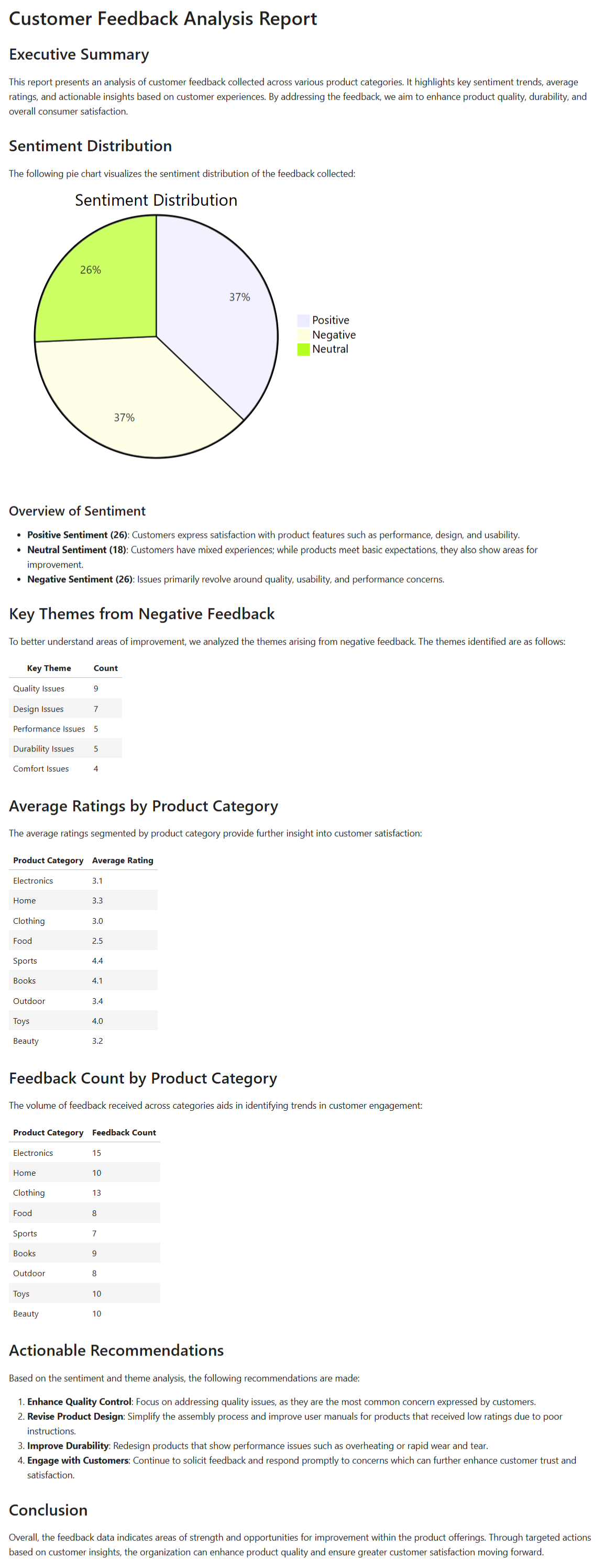
Conclusion
You now have a working example of how to use CrewAI to build a customer feedback analysis system. We defined agents and tasks in YAML, integrated a tool to read CSV feedback data, and set up a workflow that moves from sentiment evaluation to report summarization to visualization and then final report assembly.
The arrangement lets each part reference earlier outputs, which is actually really powerful once you start building more complex systems. And since configuration lives outside code, you can version control it or adjust it later without touching your main codebase.
For those looking to compare this approach with other agent architectures, you might find our tutorial on building an LLM agent from scratch with GPT-4 ReAct insightful, as it covers tool actions and control loops in detail.
You may want to extend this by enabling training mode so you can correct agents iteratively—that's something I've been experimenting with lately. Or try allowing parallel or hybrid process types if some tasks don't depend on earlier ones. Actually, if you want to go further, consider exploring structured data extraction pipelines with external tools or compare with ReAct-style agents trained from scratch for different trade-offs. The possibilities are pretty endless once you get comfortable with the basics.