How to Build an LLM Agent from Scratch with GPT-4 ReAct
Build a fully functional LLM agent in Python with the ReAct pattern, complete with reasoning, actions, and automation.

You probably use agent frameworks like LangChain or CrewAI without really seeing how they work under the hood. Here's the thing - this tutorial is your chance to peel back those layers. We're going to build a ReAct-style agent from scratch, no frameworks, no magic. When you see how each part actually works, you'll understand what those frameworks are really doing for you.
The whole approach comes from this paper "ReAct: Synergizing Reasoning and Acting in Language Models" (arXiv:2210.03629) by Yao et al. What they discovered was pretty straightforward but powerful: you get better performance and interpretability when a model both reasons (writes out its thoughts) and acts (calls tools), weaving those steps together with observations.

Why This Approach Works
Look, frameworks are convenient—I get it. But they hide so much behavior. When I first started building agents from scratch, I realized how much control you actually gain. Debugging becomes faster. You know exactly when and why the model does something, not just that it did something. You'll then be better equipped to use the frameworks with confidence.
Why GPT-4o and GPT-4o-mini? GPT-4o gives you strong reasoning for the main agent loop. GPT-4o-mini handles simple tool lookups cheaply and quickly. Honestly, this combination keeps costs reasonable without losing reliability. I've tried other setups, and this balance just works.
Why ReAct? The ReAct pattern forces the model to articulate its reasoning before taking action. That makes everything interpretable. You can actually see what it's thinking. The strict format—Thought → Action → PAUSE → Observation—lets you parse and validate every step programmatically. No guessing games.
Why not regex? We tried it—and it was brittle. Real model outputs drift (extra spaces, stray quotes, or a colon in a parameter) and our patterns cracked. We switched to a deterministic, line-based parser: find the Action:/Answer: line, split once, and normalize. It's fast, transparent, and easy to reason about. For production, you'd likely graduate to JSON-typed arguments or function/tool calling for strict schemas and validation, but this minimal parser keeps the ReAct loop understandable and debuggable.
How It Works (High-Level Overview)
Let me walk you through what actually happens:
Your agent receives a question, then generates a Thought and an Action. Something like: lookup_distance[Montreal, Boston].
The control loop parses that Action using our line-based parser, validates it, and calls the corresponding Python function.
The tool returns a result (maybe "308 miles"), which becomes the Observation.
Now the agent updates its reasoning with this new info. It either calls another tool or gives you a final Answer.
The loop stops once the agent outputs Answer: or hits the max turn limit. That last part is crucial - you don't want runaway agents eating up your API credits.
Setup & Installation
Run this cell in Colab or your local environment to install dependencies:
!pip install --upgrade openai python-dotenv
Set your OpenAI API key. In Colab:
import os
os.environ["OPENAI_API_KEY"] = "sk-..."  # Replace with your key
Or if you're working locally, create a .env file:
OPENAI_API_KEY=sk-...
Actually, before you do anything else, verify the key is set:
import os
if not os.getenv("OPENAI_API_KEY"):
    raise EnvironmentError("OPENAI_API_KEY not set. Please set it before running.")
Step-by-Step Implementation
Define the System Prompt
This is basically the contract between you and the model. It enforces the ReAct format and lists available actions with their exact signatures. Get this wrong, and nothing else will work properly.
SYSTEM_PROMPT = """
You operate in a structured loop consisting of Thought, Action, PAUSE, and Observation.
At the end of the loop, you output an Answer. Follow this process to reason through questions and perform actions to provide accurate results.

Process Breakdown:
1. Thought: Think through the question and explain your reasoning about the next action to take.
2. Action: Use one of the available actions to gather information or perform calculations. Follow the correct syntax for the action. End with PAUSE after specifying the action.
3. Observation: Review the result of the action and decide the next step. Continue the loop as needed until the question is fully resolved.
4. Answer: Once all steps are complete, provide a clear and concise response.

Available Actions:
- lookup_distance:
  e.g., lookup_distance: Toronto to Montreal
  Finds the driving distance between two locations in kilometers.

- calculate_travel_time:
  e.g., calculate_travel_time: 540 km at 100 km/h
  Calculates the travel time for a given distance at the specified average speed.

- calculate_sum:
  e.g., calculate_sum: 3.88 hours + 5.54 hours
  Sums two values with units (e.g., hours or kilometers) and returns the total.

Example Session:
Question: How long will it take to drive from Toronto to Montreal if I travel at an average speed of 110 km/h?

Thought: I first need to find the driving distance between Toronto and Montreal using the lookup_distance action.
Action: lookup_distance: Toronto to Montreal
PAUSE

Observation: The driving distance between Toronto and Montreal is 541 kilometers.

Thought: Now, I need to calculate the travel time for 541 kilometers at an average speed of 110 km/h using the calculate_travel_time action.
Action: calculate_travel_time: 541 km at 110 km/h
PAUSE

Observation: The travel time is approximately 4.92 hours.

Answer: The drive from Toronto to Montreal will take approximately 4.92 hours if you travel at an average speed of 110 km/h.
"""
Build the Agent Class
The Agent class manages your conversation history. It makes calls to the OpenAI API and keeps track of messages so the model has full context each turn. Pretty straightforward stuff, but essential.
import os
import logging
from dataclasses import dataclass, field
from typing import List, Dict
from openai import OpenAI

logging.basicConfig(level=logging.INFO)
logger = logging.getLogger(__name__)

client = OpenAI(api_key=os.getenv("OPENAI_API_KEY"))

@dataclass
class Agent:
    system_prompt: str
    model: str = "gpt-4o"
    temperature: float = 0.0
    messages: List[Dict[str, str]] = field(default_factory=list)

    def __post_init__(self):
        self.messages = [{"role": "system", "content": self.system_prompt}]

    def __call__(self, user_content: str) -> str:
        self.messages.append({"role": "user", "content": user_content})
        return self.execute()

    def execute(self) -> str:
        resp = client.chat.completions.create(
            model=self.model,
            temperature=self.temperature,
            messages=self.messages,
        )
        content = resp.choices[0].message.content
        self.messages.append({"role": "assistant", "content": content})
        logger.debug(f"Assistant: {content}")
        return content
Implement the Tools
Each tool is just a simple Python function. Now, the distance lookup uses an LLM call for realism - I know that might seem weird, but you can swap in deterministic maps or real APIs later. The point is to show the pattern.
import re

def generate_response(prompt: str, model: str = "gpt-4o-mini") -> str:
    # Helper function to generate a simple response from a smaller model
    resp = client.chat.completions.create(
        model=model,
        temperature=0,
        messages=[
            {"role": "system", "content": "Reply with the answer only."},
            {"role": "user", "content": prompt},
        ],
    )
    return resp.choices[0].message.content.strip()

def lookup_distance(prompt: str) -> str:
    # Tool to find the driving distance between two locations using an LLM call
    gpt_prompt = f"Find the driving distance in kilometers between {prompt}. Return the result as a single sentence."
    return generate_response(gpt_prompt)

def _extract_number(s: str) -> float:
    # Helper to extract a number from a string
    m = re.search(r"(-?[0-9]+(?:\.[0-9]+)?)", s)
    if not m:
        raise ValueError(f"Cannot parse number from: {s}")
    return float(m.group(1))

def calculate_travel_time(distance: str, speed: str) -> str:
    # Tool to calculate travel time given distance and speed
    d = _extract_number(distance)
    v = _extract_number(speed)
    if v == 0:
        return "infinite hours"
    hours = d / v
    return f"{round(hours, 2)} hours"

def _extract_number_and_unit(s: str) -> (float, str):
    # Helper to extract number and unit from a string
    m = re.search(r"(-?[0-9]+(?:\.[0-9]+)?)\\s*([a-zA-Z/%]+)?", s.strip())
    if not m:
        raise ValueError(f"Cannot parse: {s}")
    value = float(m.group(1))
    unit = m.group(2) or ""
    return value, unit

def calculate_sum(value1: str, value2: str) -> str:
    # Tool to sum two values with units
    v1, u1 = _extract_number_and_unit(value1)
    v2, u2 = _extract_number_and_unit(value2)
    # Use the unit if both values have the same unit
    unit = u1 if u1 == u2 else ""
    total = v1 + v2
    return f"{round(total, 2)}{(' ' + unit) if unit else ''}"
Register Tools and Define Parsers
Here we set up a registry for dispatch. The line-based parser extracts the agent's output into actions or answers. This is where that transparency I mentioned earlier really pays off.
from typing import Optional, List, Tuple
import re

# Register available actions with their corresponding functions
KNOWN_ACTIONS = {
    "lookup_distance": lookup_distance,
    "calculate_travel_time": calculate_travel_time,
    "calculate_sum": calculate_sum,
}

def parse_action(text: str) -> Optional[Tuple[str, List[str]]]:
    # Parse the agent's output to find an action line
    action_line = None
    for line in text.splitlines():
        if line.strip().lower().startswith("action:"):
            action_line = line.strip()
            break

    if not action_line:
        return None

    # Extract action name and parameters
    action_text = action_line[len("action:"):].strip()
    action_parts = action_text.split(":", 1)

    if len(action_parts) < 2:
         return None

    name = action_parts[0].strip()
    raw_params = action_parts[1].strip()

    # Custom parsing for calculate_travel_time due to its parameter format
    if name == "calculate_travel_time":
        parts = raw_params.split(" at ")
        if len(parts) == 2:
            params = [parts[0].strip(), parts[1].strip()]
        else:
            # Handle cases where calculate_travel_time parameters are not as expected
            return None
    else:
        # Default comma splitting for other action parameters
        params = [p.strip().strip('"').strip("'") for p in raw_params.split(",")] if raw_params else []

    return name, params

def parse_answer(text: str) -> Optional[str]:
    # Parse the agent's output to find the final answer line
    answer_line = None
    for line in text.splitlines():
        if line.strip().lower().startswith("answer:"):
            answer_line = line.strip()
            break

    if not answer_line:
        return None

    # Extract the answer text
    answer_text = answer_line[len("answer:"):].strip()
    return answer_text


def validate_action(name: str, params: List[str]) -> bool:
    # Validate if the parsed action is a known action
    if name not in KNOWN_ACTIONS:
        raise ValueError(f"Unknown action: {name}")
    # Optional: Add more specific parameter validation here if needed
    return True
Build the Control Loop
This is where the magic happens. The loop goes through thinking, acting, and observing until you get a final answer or hit a turn limit. That turn limit? Super important. Trust me, you don't want runaway agents.
def run_agent_loop(question: str, max_turns: int = 10, verbose: bool = True) -> str:
    # Initialize the agent with the system prompt
    agent = Agent(system_prompt=SYSTEM_PROMPT, model="gpt-4o", temperature=0)
    # Send the initial question to the agent
    last = agent(question)

    if verbose:
        print("TURN 1 - ASSISTANT\n", last, "\n")

    turn = 1
    # Start the agent loop
    while turn < max_turns:
        # Attempt to parse the final answer
        answer = parse_answer(last)
        if answer:
            # If an answer is found, print and return it
            if verbose:
                print("FINAL ANSWER\n", answer)
            return answer

        # If no answer, attempt to parse an action
        parsed = parse_action(last)
        if not parsed:
            # If no action or answer is found, stop the loop
            if verbose:
                print("No action or answer detected. Stopping.")
            return "Unable to complete: no action or answer detected."

        # Extract action name and parameters
        name, params = parsed
        try:
            # Validate the action and execute the corresponding tool
            validate_action(name, params)
            tool = KNOWN_ACTIONS[name]
            result = tool(*params)
        except Exception as e:
            # Handle any errors during tool execution
            result = f"ERROR: {str(e)}"

        # Format the tool result as an observation
        obs_msg = f"Observation: {result}"
        turn += 1
        # Send the observation back to the agent for the next turn
        last = agent(obs_msg)

        if verbose:
            print(f"TURN {turn} - OBSERVATION\n", obs_msg)
            print(f"TURN {turn} - ASSISTANT\n", last, "\n")

    # If the maximum number of turns is reached without finding an answer
    if verbose:
        print("Max turns reached without final answer.")
    return "Unable to complete within turn limit."
Run and Validate
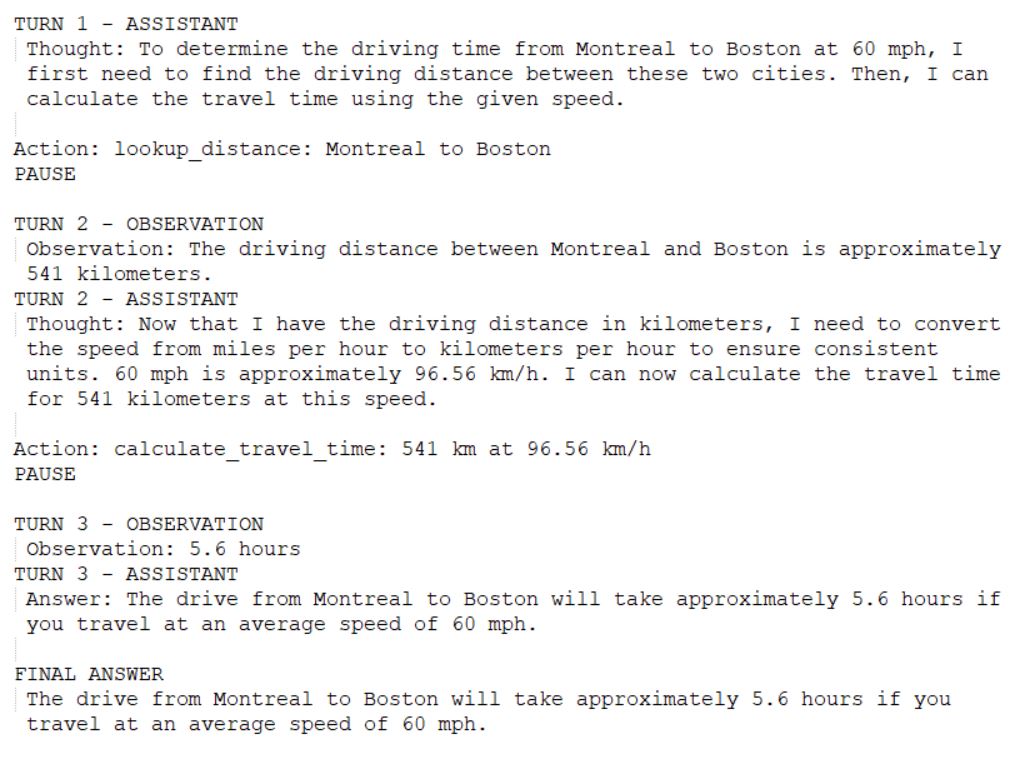
Let's test the agent with a multi-step question that requires two tool calls: distance lookup, then travel time calculation. This is where you see if everything actually works together.
if __name__ == "__main__":
    print(run_agent_loop("How long to drive from Montreal to Boston at 60 mph?", max_turns=8))
Expected output:
Connecting Back to ReAct (the Paper)
So what does "ReAct: Synergizing Reasoning and Acting in Language Models" actually teach us? And how did it shape this tutorial?
The paper shows that when you interleave reasoning and action, you get much more robust behavior. Makes sense when you think about it - reasoning lets the model plan, actions let it get grounded information, and observations let it correct and update what it thought. It's like... actually, it's exactly like how we solve problems ourselves.
What's interesting is that ReAct outperformed both reasoning-only approaches (Chain-of-Thought) and acting-only approaches on tasks like HotpotQA and FEVER. It reduces hallucinations and error propagation by using external sources. The model can't just make stuff up when it has to check with tools.
The format we're using here is basically identical: Thought → Action → Observation → Thought → … → Answer. That gives you both interpretability and control. You can see exactly where things go wrong if they do.
And here's the thing - if you look at the frameworks you already use, they adopt very similar contracts. They make you define tool signatures, control loops, stopping criteria, all of it. This tutorial reproduces those pieces explicitly so you can actually see them working.
You're now set up to experiment. Add more tools, tweak the formats, change the logic - whatever you want. Doing this by hand teaches you what the frameworks automate. And honestly? That knowledge will make you a better builder and a much better debugger. When something goes wrong (and it will), you'll know exactly where to look.