Fine-Tuning 101: Customizing Language Models from Human Preferences
Transform general-purpose LLMs into specialized, instruction-following models that understand your tasks, reduce token waste, and perform with precision.

When I first started working with smaller open source Language Models, I kept running into this frustrating issue. The pre-trained models I was using could predict the next word just fine - they'd been trained on massive datasets and understood language pretty well. But getting them to actually follow my instructions? That was a whole different story.
Some of the bigger LLMs, the really impressive ones, can actually figure out what you're asking without any extra help. This is called zero-shot inference. You just ask, and the model delivers. But then you try the same thing with a smaller model - maybe because you're working with limited resources or need faster response times - and suddenly you're stuck. These models need examples, sometimes lots of them, to understand what you want. We call this one-shot or few-shot inference, where you basically show the model "here's what I want you to do" with a couple of examples first.
But wait, it gets more complicated. Even when I'd stuff my prompts with examples (eating up precious tokens from the context window, by the way), many models still struggled when I needed really specific outputs. That's when I discovered instruction fine-tuning, and it completely changed how I approach these problems. Let me walk you through what I've learned about making LLMs actually listen to what you're asking them to do.

What is Instruction Fine-Tuning
So instruction fine-tuning - it's basically teaching your model to be a better listener. You're using supervised learning to update the model's weights with a dataset of labeled examples. But here's what makes it special: these examples are structured as prompt-completion pairs. The prompt gives an instruction, and the completion shows exactly how you want the model to respond.
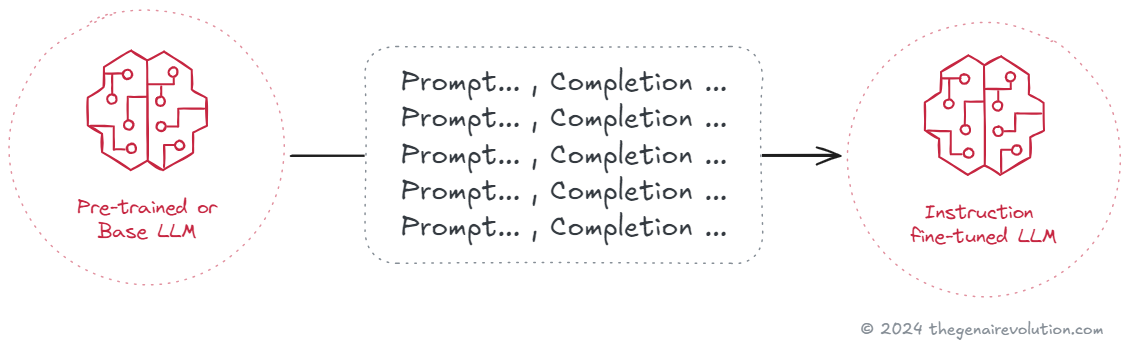
Let me give you a real example from a project I worked on last year. I needed a model that could classify technical support tickets in a very specific way for a client's system. So I built a dataset where each entry had a prompt like "Classify the urgency of this support ticket: [actual ticket text]" paired with the correct classification: "Critical," "High," "Medium," or "Low." After fine-tuning, the model understood exactly what I meant when I asked it to classify something.
What really surprised me was how little data I actually needed. I was expecting to need thousands and thousands of examples, but I got significant improvements with just around 800 examples. Compare that to the billions of words these models see during pre-training - it's nothing! Yet it made all the difference.
If you're trying to decide whether to fine-tune a smaller model or just use a larger one as-is, I've written about the tradeoffs in my piece on Small vs Large Language Models. Sometimes a fine-tuned small model can actually outperform a large generic one, especially when you factor in cost and latency.
Important Fine-Tuning Concepts
Before you jump into fine-tuning (like I did, somewhat naively at first), there are some crucial concepts you really need to understand.
Full Fine-Tuning
When most people talk about instruction fine-tuning, they mean full fine-tuning. This is where you update every single parameter in the model. You're essentially rebuilding the model from the ground up to follow your specific instructions better.
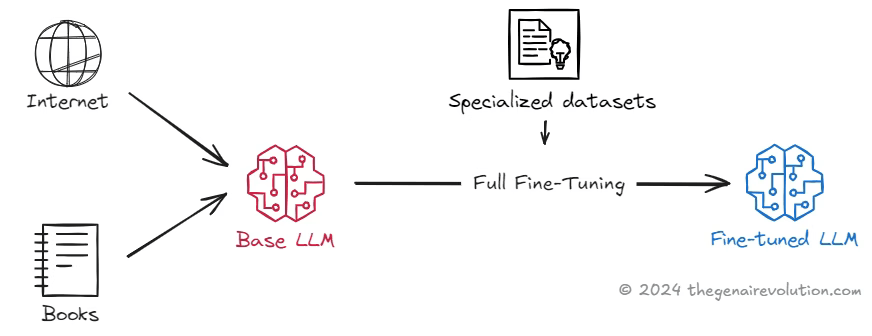
I tried this approach first because, well, go big or go home, right? And it does give you the most comprehensive customization. The model I fine-tuned this way was incredibly good at the specific task I trained it for. But - and this is a big but - it required serious computational resources. My cloud computing bill that month was... let's just say it was educational.
Plus, there's this thing called catastrophic forgetting that I learned about the hard way. Basically, your model gets so good at the new task that it forgets how to do other things it used to know. It's like teaching someone to be an expert chef and then discovering they've forgotten how to make a simple sandwich.
Catastrophic Forgetting
Catastrophic forgetting hit me hard on one project. I'd fine-tuned a model to generate product descriptions, and it became amazing at that task. But then when I tried to use it for basic question-answering - something the original model could do easily - it completely fell apart.
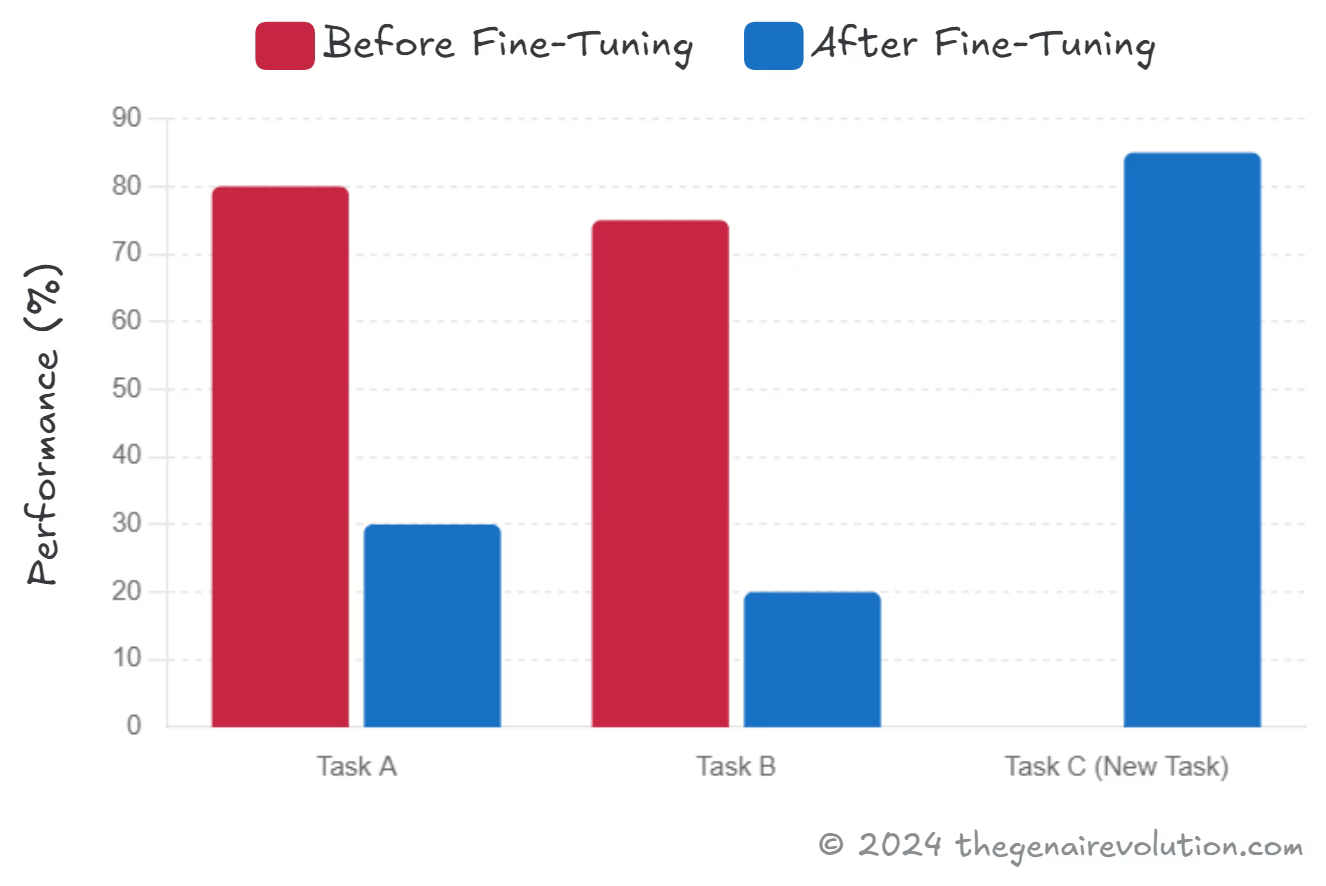
Now, catastrophic forgetting might not actually matter for your use case. If you need a model that does one thing really well, who cares if it can't write poetry anymore? But if you need versatility, then you've got to be more careful. That's when I started looking into multi-task fine-tuning and PEFT.
Multi-Task Fine-Tuning
Multi-task fine-tuning is like teaching someone to be a generalist instead of a specialist. You train the model on several different tasks at the same time, which helps it maintain its flexibility while still getting better at the specific things you care about.
I'll be honest - this is harder than it sounds. My first attempt required something like 60,000 examples across different tasks, and the training took forever. But the result was a model that could handle multiple types of requests without losing its general capabilities. It's more work upfront, but sometimes that versatility is exactly what you need.
Parameter-Efficient Fine-Tuning (PEFT)
Then I discovered PEFT, and it felt like finding a cheat code. Instead of updating all the model's parameters, PEFT only tweaks a small subset - usually these things called adapter layers. Most of the original model stays exactly the same.
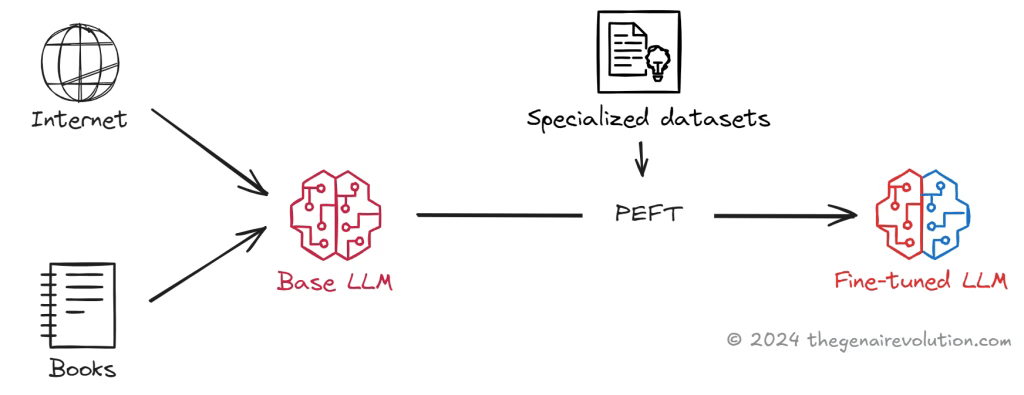
What I love about PEFT is that it's so much more resource-efficient. In one experiment with a personal project, I reduced my training time by about 70% compared to full fine-tuning, and the model still performed great on my specific task while keeping its general abilities. It's particularly useful when you're working with limited resources or when you absolutely need to preserve the model's original capabilities.
If you're still figuring out which model or approach to use, my guide on how to pick an LLM breaks down all the performance and cost considerations you'll need to think about.
The Fine-Tuning Process
1. Preparing the Training Data
Alright, so the first step - and honestly, the most tedious one - is getting your data ready. You've got two options here. You can build your dataset from scratch (which is what I usually end up doing for specialized tasks), or you can start with public datasets like The Pile, OpenAI's HumanEval for code stuff, SQuAD for Q&A, or GLUE for general language understanding.
But here's the catch - you can't just use these datasets as-is. You need to restructure everything into prompt-completion pairs. Each entry needs a clear instruction as the prompt and the exact response you want as the completion. I spent way too many late nights formatting data before I discovered tools like PromptSource and Hugging Face's Datasets library. These tools have templates that can convert existing data into the format you need. Game changer.
2. Training the Model
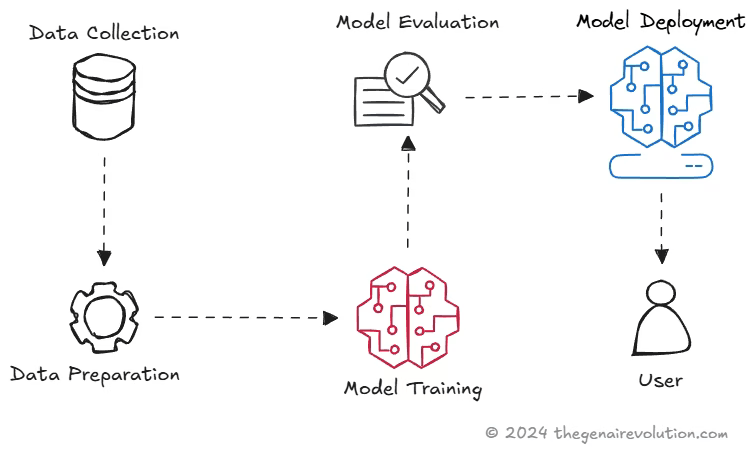
Once your data's ready, the actual training follows a pretty standard supervised learning approach. Split your data into training, validation, and test sets - I usually go with something like 70-20-10, but it depends on how much data you have.
The model takes prompts from your training set and generates completions. You compare what it produces to what you wanted (your labeled completions), calculate the loss using cross-entropy, and then adjust the weights through backpropagation. Pretty standard stuff, but watching it actually work still feels a bit magical.
You'll probably need to run multiple epochs. In my experience, somewhere between 3 and 5 epochs usually does the trick, but you've got to watch for overfitting. Speaking of which...
3. Evaluating the Model
This is where the validation set becomes your best friend. As the model trains, you keep checking its performance on data it hasn't seen. If the training loss keeps dropping but the validation loss starts going up, you're overfitting - time to stop.
Once training's done, you test the model one final time on your test set. This gives you the real performance metrics - accuracy, F1 score, whatever makes sense for your task. If everything looks good, congratulations! You've got yourself an instruct model that actually follows instructions.
Conclusion
Let me leave you with some hard-won insights from my adventures in fine-tuning.
Single-Task vs. Multi-Task Fine-Tuning Look, if you need a model that's absolutely killer at one specific thing, go with single-task fine-tuning. It's simpler, requires less data, and gives you focused performance. But if you need flexibility - if your model needs to wear multiple hats - then bite the bullet and go multi-task. Yes, it's more work, but the versatility is worth it.
Avoiding Catastrophic Forgetting This one burned me more than once. If you need your model to remember its original skills, don't do full fine-tuning on a single task. Either use multi-task fine-tuning or go with PEFT. Actually, PEFT has become my default approach unless I have a really good reason to do full fine-tuning.
Computational Requirements Be realistic about your resources. Full fine-tuning can get expensive fast, especially with larger models. I've had training runs that would've cost thousands of dollars if I hadn't caught them early. PEFT is your friend when resources are tight - it gets you most of the benefits at a fraction of the cost.
Data Quality and Quantity Here's something that took me way too long to learn: 500 really good examples beat 5,000 mediocre ones. Seriously. I once spent weeks collecting tons of data, only to get better results later with a much smaller, carefully curated dataset. For single-task fine-tuning, start with 500-1,000 high-quality examples. For multi-task, yeah, you'll need more - usually tens of thousands - but quality still matters more than quantity.
Choosing the Right Fine-Tuning Approach There's no one-size-fits-all answer here. Think about what you actually need. Do you need peak performance on one task? Single-task fine-tuning. Need versatility? Multi-task or PEFT. Limited resources? Definitely PEFT. The key is matching the approach to your actual requirements, not just picking the fanciest option.
Fine-tuning really is a powerful tool for making LLMs do what you actually want them to do. Whether you're optimizing for a single task or training for multiple instructions, there's an approach that'll work for your situation. Just remember - it's as much art as science, and you'll probably make some mistakes along the way. I certainly did. But that's how you learn what actually works.
For more on getting the most out of your prompts and understanding how models process them, you might find my analysis of Lost in the Middle: Placing Critical Info in Long Prompts helpful, especially when you're designing those training datasets.